

How do modern businesses manage to run hundreds of applications, services, and systems without constantly expanding their physical infrastructure? How is it possible to operate global digital platforms without owning vast data centres?
The answer lies in virtualisation, a foundational technology behind today’s cloud computing environments. Virtualisation has transformed the way organisations design, deploy, and manage IT systems.
It enables them to make better use of their hardware, scale operations quickly, improve disaster recovery, and significantly reduce costs. In the context of cloud computing, virtualisation is what makes the cloud flexible, efficient, and accessible.
This article explores virtualisation in depth: what it is, how it works in cloud computing, why it’s essential, the various types of virtualisation, its benefits and limitations, and the many ways it’s applied across industries.
What is Virtualisation in Cloud Computing?
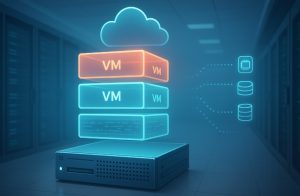
Virtualisation in cloud computing refers to the process of creating virtual versions of physical computing resources such as servers, storage devices, networks, or operating systems.
Rather than interacting directly with the hardware, users and applications interact with virtual machines (VMs), software-defined environments that function just like physical systems.
These VMs are managed by a software layer known as a hypervisor, which allocates physical resources (such as CPU, memory, and disk space) to each virtual environment while ensuring isolation between them.
This means that multiple operating systems and applications can run on a single physical server, all operating independently as though they were on separate machines.
Virtualisation enables cloud service providers to offer scalable and cost-effective infrastructure, allowing users to deploy resources on demand without purchasing or managing physical hardware themselves.
It is the foundation upon which Infrastructure as a Service (IaaS) platforms such as Amazon EC2 or Microsoft Azure Virtual Machines are built.
Why is Virtualisation So Important Today?
Virtualisation is crucial in today’s IT landscape for several reasons, all tied to the growing need for efficiency, scalability, and resilience in digital operations.
First and foremost, virtualisation optimises resource utilisation. In traditional environments, servers are often underutilised, with large portions of CPU and memory sitting idle. Virtualisation allows multiple workloads to run on the same hardware, dramatically increasing efficiency and reducing hardware sprawl.
Secondly, it supports rapid scaling. Organisations can easily scale their computing capacity up or down based on demand, something that would require purchasing and configuring new hardware in traditional setups. In a virtualised environment, provisioning new servers or applications can be done in minutes.
Moreover, virtualisation enhances business continuity and disaster recovery. Virtual machines can be backed up, duplicated, or migrated across servers without downtime, ensuring that systems remain available even in the event of hardware failures or security incidents.
It also enables remote work and centralised management. With desktop and application virtualisation, employees can access secure work environments from any location, while IT teams manage systems remotely from a centralised interface.
In essence, virtualisation has become indispensable in achieving the agility, cost-efficiency, and performance required by modern cloud-based and hybrid IT environments.
How Does Virtualization Work in Cloud Computing?
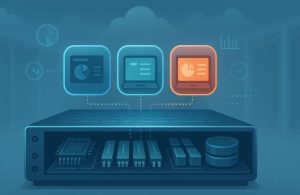
Virtualization operates through a specialised layer of software called a hypervisor, which sits between the physical hardware (the host) and the virtual environments (the guests).
The hypervisor is responsible for managing and allocating physical resources such as CPU, memory, and storage to each virtual machine (VM).
Each virtual machine operates like a separate computer with its own operating system and applications, independent of other VMs on the same host.
Users can run different operating systems on different virtual machines, all from a single piece of physical hardware. This provides a more efficient and flexible way to use computing resources.
There are two types of hypervisors:
| Hypervisor Type | Description | Examples |
| Type 1 | Bare-metal hypervisor that runs directly on the hardware | VMware ESXi, Microsoft Hyper-V |
| Type 2 | A hosted hypervisor that runs on top of an existing operating system | Oracle VirtualBox, VMware Workstation |
These hypervisors allow administrators to create multiple VMs and manage them centrally using virtualisation platforms. Popular tools include VMware vSphere, Microsoft Hyper-V, KVM, and cloud-native solutions like AWS EC2 and Azure Virtual Machines.
What Are Virtual Machines and Why Are They Central to Virtualization?
A Virtual Machine (VM) is a software-based simulation of a physical computer. It includes its own virtual CPU, memory, disk storage, and network interface, and it can run its own operating system and applications. The VM is isolated from the host system and from other VMs, even if they share the same hardware.
Each VM behaves like a completely independent computer, despite existing within the same host environment. This level of abstraction allows for significant resource optimisation, cost savings, and operational flexibility.
Virtual machines are central to many cloud services. For instance, when users deploy an EC2 instance on AWS, they are essentially provisioning a VM managed by Amazon’s hypervisor layer.
What Are the Types of Virtualization in Cloud Computing?
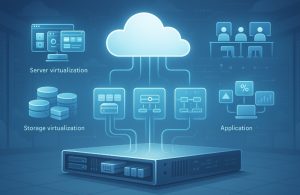
Virtualization is not a one-size-fits-all technology. It comes in multiple forms, each addressing specific areas of IT infrastructure:
1. Server Virtualization
This involves dividing a single physical server into multiple virtual servers. Each virtual server can run its own operating system and applications. Server virtualisation is the most common form and is widely used in data centres to maximise hardware utilisation.
Example: A business might run a web server, a database server, and a file server on separate virtual machines hosted on the same physical server.
2. Storage Virtualization
Storage virtualization pools together storage resources from multiple physical devices and presents them as a single logical storage unit. This allows for better management, scalability, and redundancy.
Example: Using Amazon S3 to create a centralised and virtualised storage solution accessible from any device or application.
3. Network Virtualization
This creates virtual networks that run independently over the same physical infrastructure. It allows the simulation of routers, switches, firewalls, and VPNs entirely through software.
Example: Google Cloud’s Virtual Private Cloud (VPC) lets businesses create isolated virtual networks with full control over IP address ranges, subnets, and routing.
4. Desktop Virtualization
This allows users to access a virtual desktop environment hosted in a data centre or cloud. It is particularly useful for remote work and secure BYOD (Bring Your Own Device) policies.
Example: Amazon WorkSpaces provides virtual desktops that can be accessed from various devices, ensuring consistent user experience and centralised management.
5. Application Virtualization
Applications are abstracted from the underlying OS and delivered virtually. This allows apps to run on incompatible systems or be streamed to a device without full installation.
Example: Microsoft Azure enables application streaming so that users can interact with software without installing it locally.
6. Data Virtualization
Data from multiple sources is aggregated into a unified view without moving or copying it physically. This enables real-time data integration and analysis across platforms.
Example: IBM’s data virtualization tools allow businesses to access data stored across various systems in real-time for better decision-making.
Why Is Virtualization Critical in Cloud Computing?
Virtualisation is the backbone of cloud computing. It allows cloud providers to serve multiple clients using the same physical infrastructure while ensuring each customer operates in a secure, isolated environment.
Without virtualization, cloud services such as IaaS (Infrastructure as a Service), PaaS (Platform as a Service), and even SaaS (Software as a Service) would be significantly more expensive and harder to manage.
Additionally, virtualization facilitates on-demand resource provisioning. Users can scale their virtual environments up or down as required, without needing to purchase or install new hardware.
How Is Virtualization Different from Cloud Computing?
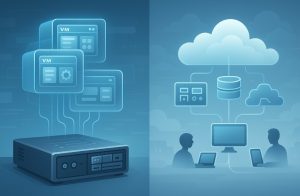
Though related, virtualization and cloud computing are not the same. The former is a technology, while the latter is a service model built upon that technology.
| Aspect | Virtualization | Cloud Computing |
| Definition | Simulating physical hardware using software | Providing remote computing services via the internet |
| Functionality | Allows multiple VMs on one physical device | Offers access to virtualized resources over the internet |
| Control | Managed locally or in private data centres | Managed by third-party cloud providers |
| Key Technologies | Hypervisors, virtual machines, storage pooling | IaaS, PaaS, SaaS platforms |
| Example | VMware vSphere creating VMs | AWS EC2 providing on-demand virtual servers |
How Is Virtualization Different from Containerization?
Containerisation is often viewed as a more lightweight alternative to server virtualisation. While both technologies offer isolation, containers share the host OS kernel, making them faster and more resource-efficient.
| Aspect | Virtualization | Containerisation |
| OS Layer | Each VM runs its own OS | Containers share the host OS kernel |
| Startup Time | Slower (full OS boot) | Faster (starts almost instantly) |
| Resource Usage | Higher | Lower |
| Portability | Moderate | High |
| Use Case | Running different OSs or legacy systems | Running microservices or scalable applications |
What Are the Benefits of Virtualization in the Cloud?
Virtualization brings multiple business advantages. It enables efficient use of existing hardware, streamlines IT operations, and supports agile development and deployment strategies.
Key Benefits:
- Cost Reduction: Minimises the need for physical infrastructure.
- Scalability: Resources can be scaled instantly to meet demand.
- Resource Efficiency: Maximises hardware usage.
- Disaster Recovery: Virtual backups can be restored quickly.
- Simplified Management: Centralised control over virtual environments.
- Flexibility: VMs can be reconfigured, moved, or replicated with ease.
What Are the Drawbacks of Virtualization?
Despite its advantages, virtualization also presents some challenges:
- High Initial Costs: While operational costs decrease, initial setup for virtual environments can be expensive.
- Skilled Staff Requirement: Managing virtual infrastructure requires specialised knowledge.
- Security Risks: Improper configuration can expose VMs to vulnerabilities.
- Performance Overhead: Shared resources can occasionally lead to reduced performance if not managed properly.
What Are the Characteristics of Virtualization?

The characteristics of virtualisation define how this technology creates value and differentiates itself from traditional IT approaches. These features are the technical foundations that make virtualisation an efficient and secure way to manage IT resources.
1. Abstraction of Resources
Virtualisation abstracts the physical hardware into software-defined versions. Users and applications interact with these virtual resources as if they were real hardware components, while the underlying system handles resource mapping and allocation.
2. Isolation and Security
Each virtual machine operates independently of others. This isolation ensures that a problem in one VM, such as a software crash or security breach, does not impact the operation of other VMs.
3. Emulation
Virtualisation emulates the behaviour of physical devices using software. This makes it possible to run applications or entire operating systems on hardware that may not have originally supported them.
4. Aggregation and Sharing
Virtualisation can pool together resources from multiple physical sources (aggregation) or allow a single resource to be shared by multiple VMs (sharing). This results in optimal hardware utilisation.
5. Managed Execution
Execution of VMs is managed centrally by hypervisors and virtualisation platforms. IT administrators can control performance, deploy patches, monitor activity, and even migrate VMs between hosts without interrupting service.
Characteristics Table:
| Characteristic | Explanation |
| Abstraction | Software simulates hardware, separating users from physical constraints |
| Isolation | VMs operate independently, increasing stability and security |
| Emulation | Physical functions are replicated in software |
| Aggregation | Combines multiple resources for more powerful configurations |
| Sharing | Allows multiple systems to share one physical component |
| Managed Execution | Centralised control of workloads and performance |
What Are the Common Use Cases of Virtualization?
Virtualisation is used across industries and departments:
- Data Centres: Consolidate multiple servers into fewer physical machines.
- Software Testing: Run isolated test environments without affecting production.
- Remote Work: Deploy virtual desktops to employees working from various locations.
- Cloud Providers: Enable multi-tenant infrastructure on a shared hardware base.
FAQs
What makes virtualization essential for cloud platforms?
Virtualization allows cloud providers to host multiple users on the same hardware while ensuring isolation and security, making cloud computing cost-effective and scalable.
Can a virtual machine run a different OS from the host?
Yes, a virtual machine can run any operating system supported by the hypervisor, regardless of the host OS.
How does storage virtualization help data management?
It pools physical storage devices into a single virtual storage unit, simplifying data access, backup, and recovery.
Is application virtualisation suitable for legacy software?
Yes, application virtualization allows legacy software to run on incompatible systems without reconfiguration.
Does virtualisation improve disaster recovery?
Yes, it allows quick restoration of systems through virtual backups, reducing downtime.
What is a virtual desktop and who uses it?
A virtual desktop is a desktop environment hosted on a server. It is used by businesses to provide secure and consistent access for remote employees.
How do hypervisors manage multiple virtual machines?
Hypervisors allocate physical resources to each VM, manage isolation, and ensure balanced performance across all VMs.