
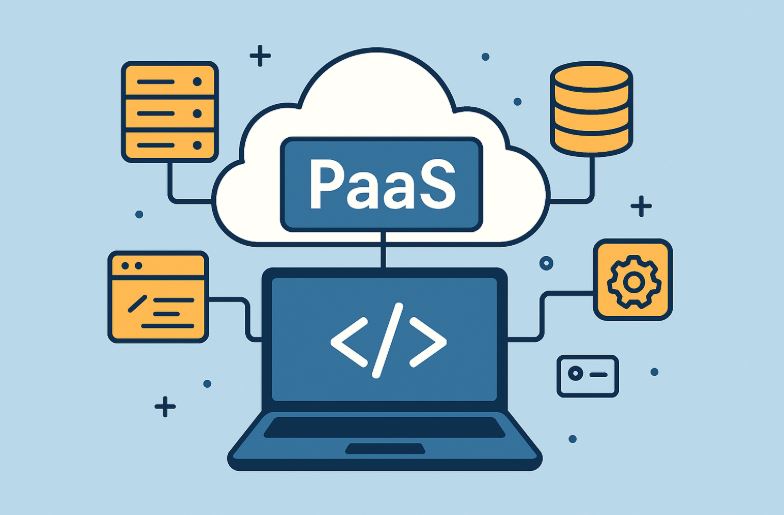
Platform as a Service (PaaS) is reshaping how software applications are developed and delivered. By removing the complexities of infrastructure setup and system maintenance, PaaS empowers development teams to focus solely on building, testing, and deploying applications.
It offers a streamlined, scalable, and cost-effective alternative to traditional on-premise environments, making it a critical solution in the cloud computing landscape.
What Does Platform as a Service (PaaS) Mean in Cloud Computing?
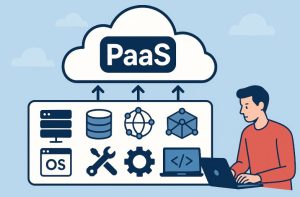
Platform as a Service (PaaS) is a cloud computing service model that provides a complete development and deployment environment over the internet.
It includes essential components such as servers, storage, networking, operating systems, databases, middleware, and development tools, all managed by a third-party provider.
With PaaS, developers can build and deploy applications without the need to purchase or maintain physical infrastructure. It supports the full software development lifecycle, from coding and testing to deployment and updates, and is typically offered on a pay-as-you-go or subscription basis.
PaaS allows organisations to reduce operational overhead, accelerate project timelines, and scale resources on demand.
How Does PaaS Work in Cloud Computing Environments?
PaaS operates by abstracting the entire software development environment and offering it as a cloud-hosted service. The architecture typically comprises the following layers:
- Infrastructure Layer: Includes virtual machines, storage, networking components, and load balancers.
- Middleware Layer: Offers runtime environments, databases, messaging services, and libraries.
- Development Tools: Provides frameworks, APIs, software development kits (SDKs), and testing environments.
- User Access Layer: Offers interfaces such as web consoles, CLI tools, or REST APIs for accessing services.
The application lifecycle, ranging from design and development to testing and deployment, takes place within this hosted environment. Developers can access these tools from any location, encouraging real-time collaboration, especially in distributed teams.
Applications built within a PaaS environment can be deployed directly onto the cloud, removing delays associated with infrastructure provisioning and manual deployment tasks.
What Makes PaaS Different from IaaS and SaaS?
Cloud computing services are generally classified into three categories: Infrastructure as a Service (IaaS), Platform as a Service (PaaS), and Software as a Service (SaaS). Each serves a different layer of the IT stack.
Comparison of IaaS, PaaS, and SaaS:
| Category | Managed by Provider | Managed by User | Suitable For | Examples |
| IaaS | Servers, storage, networking, virtualisation | OS, middleware, runtime, apps, data | System administrators, IT managers | AWS EC2, Google Compute Engine |
| PaaS | Infrastructure + OS + middleware | Applications and data | Developers, DevOps teams | Google App Engine, Azure App Services |
| SaaS | Full application stack | User data only | End users | Salesforce, Dropbox, Google Workspace |
PaaS stands out by providing a middle layer: it handles infrastructure and runtime environments while granting developers the freedom to code and manage only their applications.
Why Do Businesses in India Prefer PaaS Today?
The Indian technology sector has rapidly evolved with startups, MSMEs, and enterprises all seeking ways to modernize their operations without overspending. PaaS is particularly attractive because:
- It eliminates the need for costly on-premise infrastructure.
- It supports fast deployment of applications, a vital requirement in competitive markets.
- It reduces the burden on internal IT Support Services teams by automating patching, updates, and scalability.
- It supports regulatory compliance through cybersecurity and governance features embedded by providers.
With broadband and cloud access improving nationwide, even tier-2 and tier-3 cities are adopting PaaS to build locally relevant, globally scalable solutions.
What Are the Main Benefits of Using Platform as a Service?

PaaS offers significant advantages that go beyond basic cloud hosting. Some of the most valued benefits include:
How Does PaaS Help Accelerate Time to Market?
Developers can begin coding immediately without waiting for infrastructure setup or approval cycles. Ready-made environments accelerate deployment cycles and support agile methodologies.
How Does PaaS Contribute to Cost Savings?
Pay-as-you-use models eliminate upfront infrastructure investments. Organisations only pay for the resources they consume, and software licensing costs are typically bundled into the service.
How Does PaaS Enable Scalability on Demand?
PaaS platforms can automatically adjust resource allocation to handle traffic spikes or user growth without manual intervention.
How Does PaaS Reduce Maintenance Overhead?
The platform provider handles updates, patch management, and software upgrades, freeing IT support staff to focus on strategic initiatives.
How Does PaaS Improve Team Collaboration?
Development and DevOps teams can work simultaneously on the same projects from different locations using shared tools and resources.
How Does PaaS Enhance Security and Compliance?
Most PaaS providers include features like identity and access management, encryption, and threat detection, helping businesses meet compliance and security standards.
What Use Cases Are Best Supported by PaaS?
PaaS serves a wide range of industries and use cases. Whether you’re building enterprise-grade systems or customer-facing apps, the versatility of PaaS stands out. Some notable use cases include:
- Web Application Development: Ideal for front-end and back-end integration using languages like Python, Java, PHP, and Node.js.
- API Development: Quick creation and exposure of APIs using built-in management tools.
- Microservices Architecture: Support for container-based deployment using Docker and Kubernetes.
- Machine Learning Pipelines: Access to ML toolkits and pre-trained models through platforms like Google AI or IBM Watson.
- Enterprise Mobility: Tools for developing mobile apps with geolocation, camera access, and push notifications.
These use cases make PaaS suitable for both startups needing fast go-to-market and enterprises with complex integration demands.
What Are the Different Types of Platform as a Service Models?
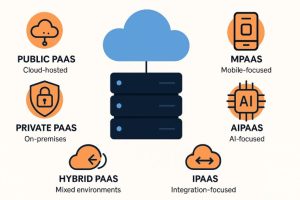
Platform as a Service has evolved into a diverse set of service models, each catering to different development needs, deployment preferences, and enterprise requirements.
These models allow organisations to choose an environment that aligns with their application types, data control preferences, integration demands, and compliance obligations.
The table below summarises the key types of PaaS models:
| PaaS Type | Description | Use Case | Deployment |
| Public PaaS | Hosted on a public cloud and managed entirely by a third-party provider. | Web/mobile apps, startups, quick prototypes | Cloud-hosted (shared infra) |
| Private PaaS | Deployed on-premises or within a private cloud behind a firewall. | Sensitive data, financial or healthcare sectors | On-prem/private cloud |
| Hybrid PaaS | Combines public and private PaaS environments for flexibility and control. | Large enterprises, mixed cloud strategies | Mixed environments |
| AIPaaS | Designed for building and deploying AI and machine learning models. | Predictive analytics, NLP, automation | Public or hybrid cloud |
| iPaaS | Integration-focused PaaS that connects disparate applications and services. | Middleware, system integration, data sync | Cloud or hybrid |
| mPaaS | Tailored for mobile app development, often with low-code capabilities. | Android/iOS app development, cross-platform apps | Cloud/mobile cloud |
| cPaaS | Enables adding real-time communication features to applications. | Video calling, messaging apps, contact centres | Cloud |
| Open PaaS | Open-source PaaS allowing full control over the platform’s features and configurations. | Custom PaaS development, highly regulated industries | On-prem or public cloud |
What are the Key Considerations When Choosing a PaaS Model?
- Data Privacy: Private and hybrid models are better for regulatory compliance.
- Cost Efficiency: Public PaaS offers shared infrastructure, reducing overall costs.
- Integration Needs: iPaaS is ideal for businesses using multiple software environments.
- Scalability & AI Readiness: AIPaaS and hybrid PaaS are suited for scaling complex workflows.
Each model addresses a specific need, and the right choice depends on organisational priorities such as budget, control, security, and application type.
Who Are the Leading PaaS Providers Today?
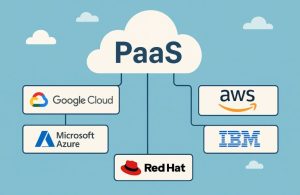
The global PaaS landscape is dominated by both large cloud service providers and specialised vendors offering tailored services for niche development needs. Here’s a breakdown of the major players in the market:
| Provider | Platform/Product | Key Features |
| Google Cloud | Google App Engine | Automatic scaling, multi-language support, tight GCP integration |
| Microsoft Azure | Azure App Service | Enterprise-grade security, .NET framework support, Visual Studio integration |
| Amazon Web Services | AWS Elastic Beanstalk | Full control over underlying resources, deep AWS ecosystem integration |
| IBM | IBM Cloud Foundry | Hybrid deployment, AI integrations via Watson, compliance-ready features |
| Red Hat | OpenShift | Kubernetes-native, hybrid/multi-cloud, CI/CD pipelines, developer tools |
| Salesforce | Heroku | Simple deployment, polyglot support, GitHub integration |
| SAP | SAP Business Technology Platform | Enterprise-grade app and extension building with prebuilt business services |
| Oracle | Oracle Cloud Infrastructure (OCI) | Enterprise app development, strong database integration |
| Mendix | Mendix Platform | Low-code/no-code development, rapid app delivery for business users |
What Sets These Providers Apart?
- Google App Engine is popular for cloud-native web applications and microservices.
- Azure App Service attracts enterprises already using Microsoft products.
- AWS Elastic Beanstalk is ideal for apps needing deep customisation within AWS.
- Heroku is widely favoured by startups and developers for its ease of use.
- OpenShift is the go-to for container-based, cloud-native app development.
- SAP and Oracle cater to large enterprises seeking deep business integration.
Choosing a provider often depends on your current cloud strategy, programming language preference, pricing model, and required compliance support.
What Are the Limitations or Risks Associated with PaaS?
Despite the many advantages, PaaS is not without its limitations. Organisations must evaluate these risks carefully to ensure they align with their goals and risk tolerance.
1. Vendor Lock-In
One of the most cited concerns is the difficulty in migrating from one provider to another. Applications built on specific platforms may rely on proprietary APIs, tools, or configurations that are not compatible elsewhere. This makes switching providers costly and time-consuming.
2. Limited Customisation
Since PaaS abstracts much of the infrastructure and middleware, custom configurations, especially at the system level, may not be allowed. This could restrict developers needing deep-level control for certain use cases.
3. Service Downtime
As the platform is entirely dependent on the provider’s uptime, any disruptions, outages, or scheduled maintenance can impact application availability. Although most platforms offer robust SLAs, any breach can affect business continuity.
4. Security and Compliance Concerns
Data stored on public cloud platforms must be carefully managed to meet compliance standards like GDPR, HIPAA, or India’s DPDP Act. While providers offer strong security protocols, the responsibility is often shared, requiring internal teams to manage access control, encryption policies, and secure coding practices.
5. Feature Deprecation
PaaS providers continuously evolve their services, sometimes deprecating or removing tools that are no longer supported. This can disrupt ongoing projects or force developers to re-architect parts of the application.
6. Cost Management Complexity
While PaaS is marketed as cost-effective, poor resource management, underutilisation, or overprovisioning can lead to budget overruns. Without proper monitoring and optimisation, teams may end up spending more than expected.
7. Data Portability Issues
Some PaaS environments make it difficult to export application data and configurations. This can limit disaster recovery strategies or integration with external platforms.
How Will PaaS Evolve in the Coming Years?

The future of Platform as a Service is closely tied to the evolution of emerging technologies such as artificial intelligence, edge computing, and serverless architecture. We are already seeing trends such as:
- Container-native PaaS: Platforms built to support microservices and Kubernetes.
- Serverless PaaS: Developers only focus on functions; the platform auto-scales and handles runtime.
- Edge PaaS: Enables processing closer to the source of data, reducing latency for IoT and mobile apps.
- AI-integrated Platforms: PaaS offerings with built-in AI tools for real-time data processing and automation.
For Indian businesses looking to lead in areas like fintech, healthtech, edtech, and e-governance, PaaS provides the agility and scale needed to innovate rapidly.
Is PaaS the Right Fit for Your Organisation’s Growth Strategy?
Whether you’re a startup aiming to disrupt the market or an established enterprise looking to modernise legacy systems, PaaS aligns well with today’s digital goals. It offers the flexibility to experiment, the scalability to support growth, and the simplicity to accelerate innovation.
As cloud-native becomes the new normal, PaaS is not merely a convenience, it’s a strategic asset. For businesses in India, where both technical talent and entrepreneurial spirit are in abundance, PaaS empowers teams to focus on building better products without infrastructure concerns.
Choosing the right provider, evaluating your workload requirements, and aligning the platform with long-term goals can make PaaS a powerful enabler in your digital transformation journey.
Frequently Asked Questions
What types of applications can be built with PaaS?
PaaS supports development of a wide range of applications, including web and mobile apps, APIs, data processing systems, AI models, and business tools.
Is PaaS only suitable for large companies?
No, PaaS is scalable and budget-friendly, making it ideal for startups, SMEs, and large enterprises alike.
How do I ensure security in a PaaS environment?
Security depends on the provider. Look for platforms that offer data encryption, identity management, role-based access control, and regular audits.
Can PaaS be used for legacy application modernisation?
Yes, many businesses use PaaS to replatform or refactor legacy apps, leveraging cloud-native benefits while maintaining business logic.
Is it possible to switch PaaS providers easily?
Switching is possible but not always easy due to proprietary configurations. It’s essential to consider interoperability and open standards when selecting a provider.
What level of control do I have in a PaaS model?
You control the applications and data, while the provider manages the infrastructure and runtime environment.
How does PaaS support DevOps practices?
PaaS platforms offer built-in CI/CD tools, version control, collaboration features, and automated testing environments that align with DevOps methodologies.